Navigation: CATraxx FAQ > Data Entry >
How do I add tracks to side B?


|
Navigation: CATraxx FAQ > Data Entry > How do I add tracks to side B? |
|
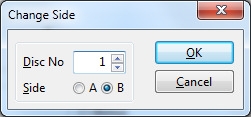
When adding tracks to a vinyl record (or any media with 2 sides), you must tell CATraxx when you want to start adding tracks to side B.
Choose Change Side from the Tracks menu in the 'Track Edit' window, select 'Side B' , then click OK.