Use this function if you have moved the audio files from one drive to another drive, or from one folder to another folder.
| 1. | Choose Update Path / Audio Files from the Tools menu.
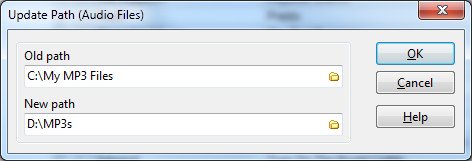
You see the 'Update Path' window. |
| 2. | In the Old Path text box, specify where the audio files were previously stored. |
| 3. | In the New Path text box, specify where the audio files are stored now.
For example, if you have moved your MP3 files from C:\My MP3 Files to D:\MP3s, type C:\My MP3 Files in the Old Path text box, and D:\MP3s in the New Path text box.
 |


