|
Check albums out using the 'Check Titles In/Out' window |
  
|
|
Check albums out using the 'Check Titles In/Out' window |
|
| 1. | Choose Check Titles Out from the Loan menu. You see the 'Check Titles In/Out' window. |
| 2. | If you have a bar code scanner (and the borrower's barcode number is registered in the Borrower lookup table), scan the bar code on the borrowers library card into the Borrower field. CATraxx will automatically lookup the borrower name. If you don't have a bar code scanner, click the Search button  to manually search for the borrower. to manually search for the borrower. |
| 3. | Make sure the Date Borrowed and Date Due fields are correctly filled in. |
| 4. | If you have a bar code scanner, scan the bar code on the album into the Bar Code No field. CATraxx will automatically look up the album in the database and add it to the list below. If you don't have a bar code scanner, click the Search button to manually search for the album you want to check out. |
| 5. | Repeat step 4 for all albums you want to check out to the selected borrower. |
| 6. | Click the Update button. |
| 7. | If you would like to print out a receipt, click the Print Receipt button. Note: If you would like to automatically print the receipt when you click the Update button, click the drop-down button to the right and select Automatically Print Receipt from the popup menu. Note: If you would like to edit the layout of the receipt, click the drop-down button to the right and choose Open in Report Designer from the popup menu. 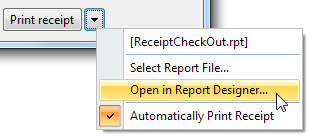 |