|
Types of information |
  
|
|
Types of information |
|
CATraxx stores several types of information:
| • |  Albums. You can enter information such as artist, title, format, label, catalog number, purchase price, genre, reference number, etc. "Album" is a general term that can mean a CD, a LP, a vinyl single, a digital album, and so forth. An album can contain an unlimited number of tracks. Albums. You can enter information such as artist, title, format, label, catalog number, purchase price, genre, reference number, etc. "Album" is a general term that can mean a CD, a LP, a vinyl single, a digital album, and so forth. An album can contain an unlimited number of tracks.You work with albums in the Album View. |
| • |  Tracks. You can enter information such as artist, title, songwriters, producers, musicians, lyrics, etc. "Track" is a general term for any song, movement, or work that is contained within an album. Tracks. You can enter information such as artist, title, songwriters, producers, musicians, lyrics, etc. "Track" is a general term for any song, movement, or work that is contained within an album.You work with tracks in the Track View. Note: To add new tracks, bring up the 'Album Edit' window for the album containing the tracks, and add tracks via the track list. |
| • |  Box sets. A box set allows you to link multiple albums together. You can enter information such as artist, title, release date, and notes. Box sets. A box set allows you to link multiple albums together. You can enter information such as artist, title, release date, and notes.You work with box sets in the Box Set View. |
| • |  Lookup tables. Lookup tables are lists that contain information linked to data fields, for example the Artist, Format or Label lists. When you modify an entry in a lookup table, for example to fix a typing error, the change will be reflected in all data fields that are linked to this lookup table. Lookup tables. Lookup tables are lists that contain information linked to data fields, for example the Artist, Format or Label lists. When you modify an entry in a lookup table, for example to fix a typing error, the change will be reflected in all data fields that are linked to this lookup table.You work with lookup tables in the Lookup View. Select the lookup table you want to edit from the View button on the toolbar. 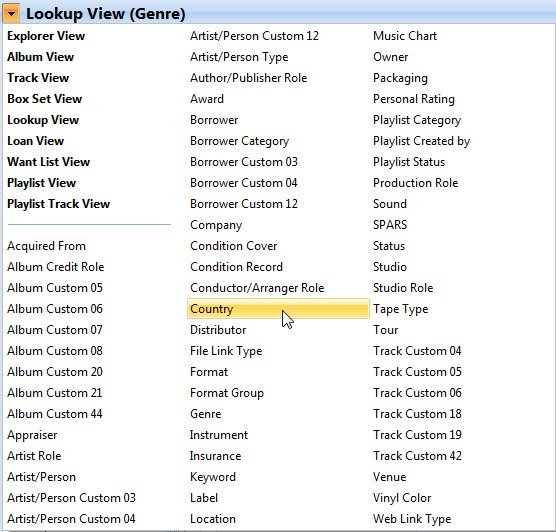 |
| • |  Loan data. This includes both albums that currently are on loan, and the complete loan history. Loan data. This includes both albums that currently are on loan, and the complete loan history.Open the Loan View to look at the loan history. To get an overview of albums current out on loan you can also use the Album View (select the On Loan filter). |
| • |  Want list. The want list allows you to keep track of albums you have on your want list. You can enter information such as artist, title, format, release date/year, label, catalog number, order date, and price. Want list. The want list allows you to keep track of albums you have on your want list. You can enter information such as artist, title, format, release date/year, label, catalog number, order date, and price.You edit the want list from the Want List View. |
| • |  Playlist data. You can create both manual and dynamic playlists. Playlist data. You can create both manual and dynamic playlists.Open the Playlist View to work with playlists. You add tracks to playlists from both the Album View and the Track View. You can also edit manual playlists from the 'Manual Playlists' window. Open the Playlist Track View to browse all tracks on manual playlists. |