Navigation: CATraxx FAQ > Loan Management >
How do I send e-mail via Gmail?


|
Navigation: CATraxx FAQ > Loan Management > How do I send e-mail via Gmail? |
|
One of the little-known freebies Gmail offers is a portable SMTP server to send mail from any network for any e-mail address. Here is how you configure CATraxx to send loan e-mails via the Gmail SMTP server:
| 1. | In the 'Send E-Mail Notifications' window, click the Server button. |
| 2. | Enter smtp.gmail.com in the SMTP server field. |
| 3. | Enter your Gmail e-mail address in the Username field. |
| 4. | Enter your Gmail password in the Password field. |
| 5. | Enter 587 in the Port field. |
| 6. | Check the Use TLS connection box. |
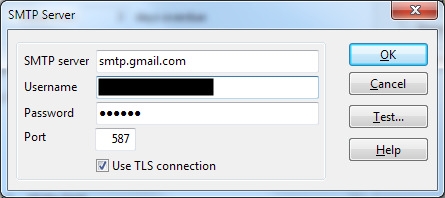
You can now test the setup by clicking the Test button.