|
Marking records and showing the marked records |
  
|
|
Marking records and showing the marked records |
|
BookCAT allows you to mark records in any table. Marking and unmarking records can be useful if you want to select different records based on specific criteria. You can view, edit, search among, or print only the records that have been marked.
The checkmark button  on the toolbar indicates whether the current record is marked or not. If the button is "in" (pressed), the record is marked. If it is "out" (released), the record is not marked. You can also simply press Ctrl + M to mark or unmark the current record.
You can also mark / unmark records by clicking the checkbox in the first column in the browse list.
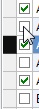
To mark all records
| 1. | Choose Mark / Mark All from the menu (for example the Book menu if the Book View is active). Note: If this command is disabled (not available), it means that all records already are marked. |
To unmark all records
| 1. | Choose Mark / Unmark All from menu (for example the Book menu if the Book View is active). Note: If this command is disabled (not available), it means that no records are marked. |
At the bottom of the main window, notice the 4 numbers in the first section of the statusbar:
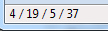
It shows the active record's position in the list (4), number of records displayed in the list (19), number of records that are marked (5), and the total number of records in the table (37).
Notice, for example, how the statusbar is updated when you use the mark commands.
By default, BookCAT displays all records in the active table. If you want to view only the records that are marked, select the Marked Records option on the List menu. This option toggles between the two modes. If only marked records were shown, all records are now shown again. If all records were shown, only the marked records are now shown.